Network Access Control (NAC) is an essential pillar of any modern cybersecurity strategy. It allows you to control, filter, and monitor connections to your organization's network, whether they come from an internal workstation, a mobile device, an external service provider, or IoT equipment.
LOGIQE deploys proven NAC solutions such as Aruba ClearPass and FortiNAC to help you ensure strictly controlled network access in compliance with your security policies and regulatory obligations.
Why implement a NAC?
- Prevent unauthorized connections to the internal network
- Identify each device (employee, guest, service provider, IoT, etc.)
- Dynamically apply access rules based on risk level
- Automatically respond to suspicious behavior
- Comply with traceability and compliance requirements (GDPR, NIS2, ISO 27001)
Key features of a well-configured NAC
Identification and classification of terminals
- Automatic discovery of connected devices (PCs, smartphones, IP cameras, etc.)
- Assigning profiles based on user, device type, or security level
- Authentication via AD/LDAP, certificates, 802.1X, SSO
Dynamic access control
- Automatic assignment of VLANs, firewalls, or filtering rules based on profile
- Blocking or quarantining non-compliant equipment
- Integration with EDR/antivirus solutions to condition access to the health status of the workstation
Orchestration and automated response
- Automatic revocation of rights in the event of abnormal activity
- Integration with SIEM and SOC for event correlation
- Real-time alerts to the CISO/CIO
Logging and compliance
- Time-stamped and actionable access logs
- Logs compliant with GDPR, HDS, or NIS2
- Integration possible with Sentinel, Graylog, or ELK
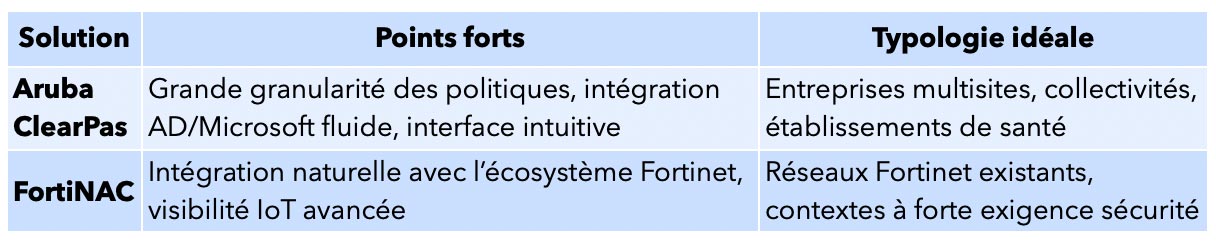
Aruba ClearPass, FortiNAC: what are the differences?
LOGIQE helps you select the NAC solution that is best suited to your network environment, business constraints, and budget:
LOGIQE handles the configuration, integration, testing, documentation, and supervision of these tools.
Examples of successful NAC integration
- Industrial SME: automatic blocking of unauthorized guest Wi-Fi connections, quarantine of outdated workstations, integration with Microsoft Defender.
- Local government: Aruba ClearPass connected to Active Directory, automated network segmentation, and GDPR-compliant logging.
- Healthcare facility: FortiNAC with visibility into biomedical equipment, access restricted to certified HDS VLANs only.
Why choose LOGIQE for your NAC project?
- Complete technical expertise (Aruba, Fortinet, Radius, 802.1X)
- Integration with existing IT systems (AD, Microsoft 365, antivirus, SIEM)
- Regulatory compliance (NIS2, HDS, GDPR, ISO 27001)
- Clear documentation and IT/CISO support
- Step-by-step approach: audit, POC, phased deployment
FAQ – Network Access Control
What is the difference between NAC and a firewall?
The firewall filters traffic after access to the network; NAC controls access itself and verifies who/what connects, how, and under what conditions.
Is NAC compatible with a guest Wi-Fi environment?
Yes, with captive portals, dynamic VLANs, and complete traffic separation.
Is an Active Directory required to implement NAC?
No, but it is recommended in order to benefit from granular access control by user groups. Other methods exist (certificates, MAC authentication, etc.).